
Decision Dashboard Examples
Decision Dashboard Examples for Better Decision-Making
Explore five practical dashboard examples for sales, executives, marketing, customer acquisition, and operations—each designed to show what matters, why it matters, and what the team should discuss next.
- •See the difference between reporting and decision support
- •Learn what each dashboard should make easier to decide
- •See real visual examples, not only dashboard theory
Quick definition
What is a decision dashboard?
A decision dashboard is designed to help people understand what needs attention, why it matters, and what decision should happen next. It does more than display KPIs: it gives the team a shared starting point for judgment, discussion, and action.
Many business reviews already contain enough data. The real difficulty is deciding which signal deserves attention first, whether the issue is serious, what may be driving it, and what the team should do next.
Signal
Show what changed and whether it crossed a meaningful threshold.
Driver
Show the factors most likely contributing to the result.
Decision
Make the next question, discussion, or action easier to identify.
Reporting vs decision support
How is a decision dashboard different from a KPI dashboard?
A KPI dashboard usually answers “What happened?” A decision dashboard goes further: does the change matter, what is driving it, and what should happen next?
Typical KPI dashboard
- •Shows many KPIs at the same level
- •Reports status after the fact
- •Leaves interpretation to the user
- •Creates more questions before action
Decision dashboard
- •Prioritizes the most important signal
- •Shows whether the change is meaningful
- •Connects the signal to likely drivers
- •Guides the next discussion or action
Five practical examples
Decision dashboard examples by business use case
Each example starts with a business question and makes the next decision easier.
Example 1
Sales decision dashboard
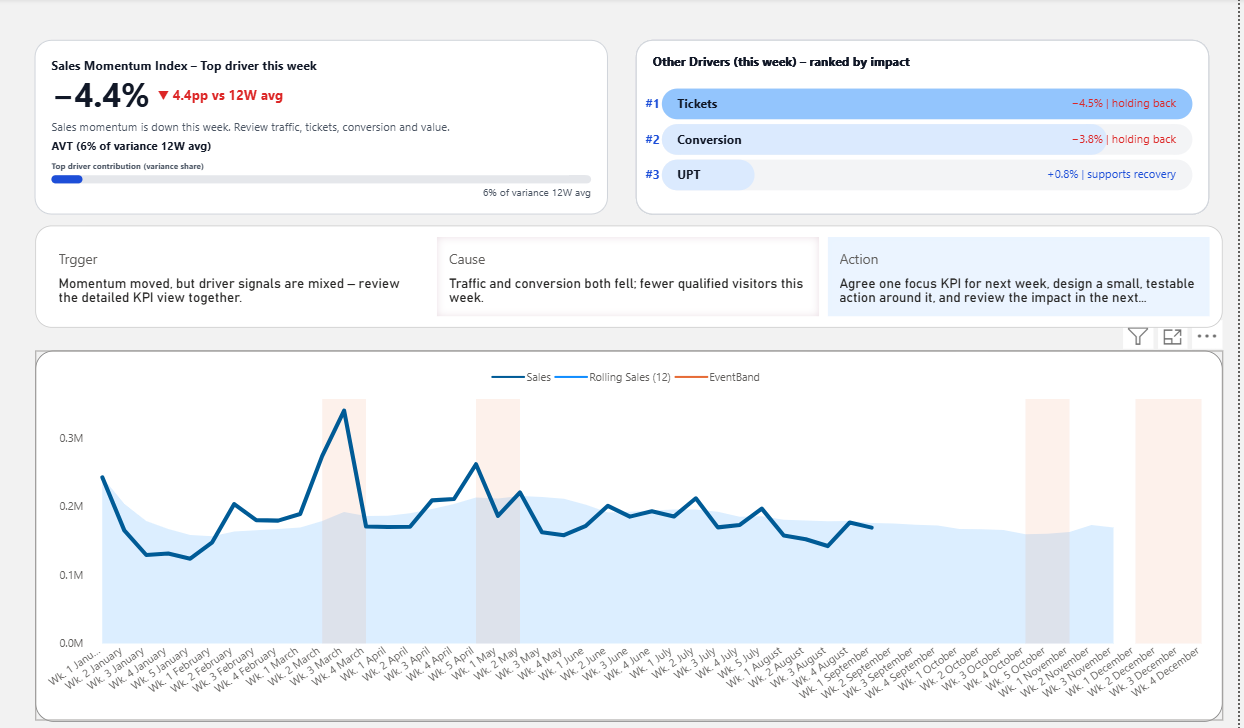
A sales dashboard may contain revenue, traffic, conversion, category performance, and variance versus target. A decision-ready version makes the first business question easier: is this normal fluctuation, or a signal requiring action?
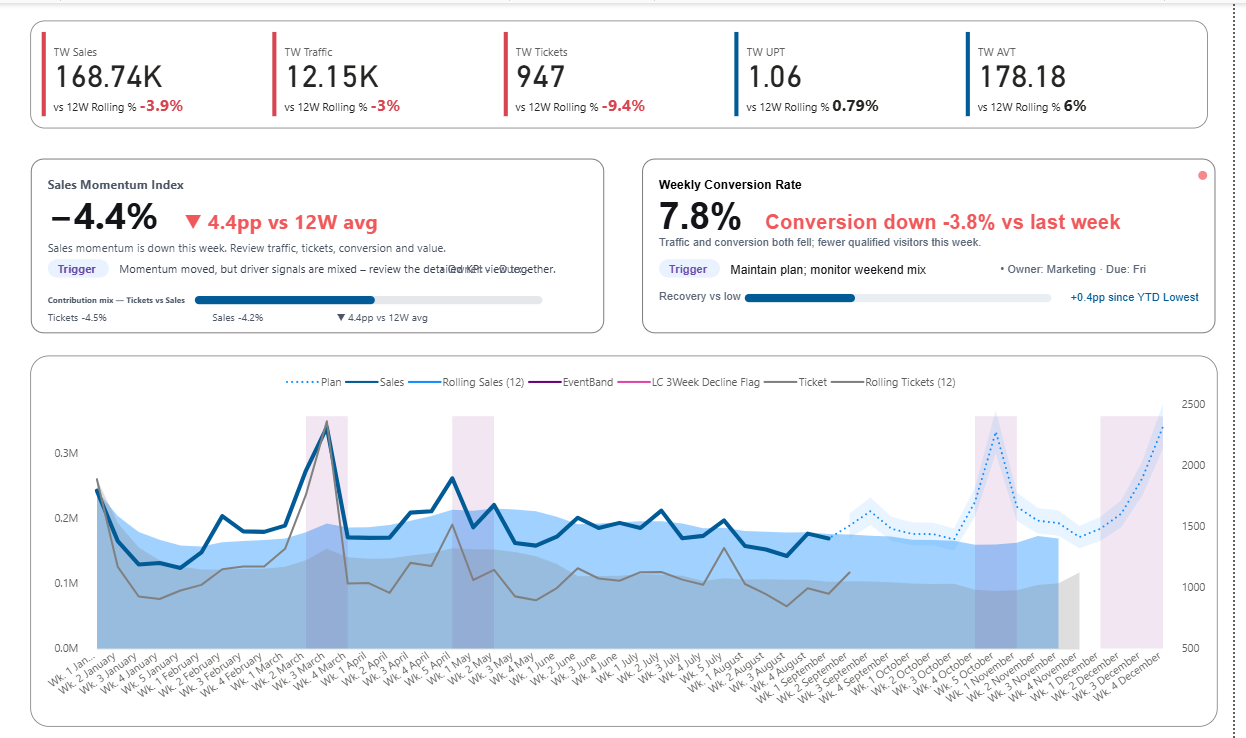
Real Power BI sales dashboard example: KPI status, momentum, conversion risk, rolling trend, and the next discussion trigger are shown in one view.
Signal
Revenue is 8.4% below target for three consecutive weeks.
Driver
Traffic is stable, while conversion and one priority category are weakening.
Decision
Choose whether to address conversion, category execution, or store performance first.
What it should show
- •Revenue versus target and threshold
- •Duration and size of the variance
- •Traffic, conversion, and category contribution
- •Priority stores, regions, or categories
Use this when
Weekly sales reviews produce general action plans or repeat the same discussion.
Example 2
Executive decision dashboard example
Executives rarely need more charts. They need a dashboard that compresses complexity into a business signal they can judge quickly. This example moves from threshold to signal, driver, decision, owner, and action.
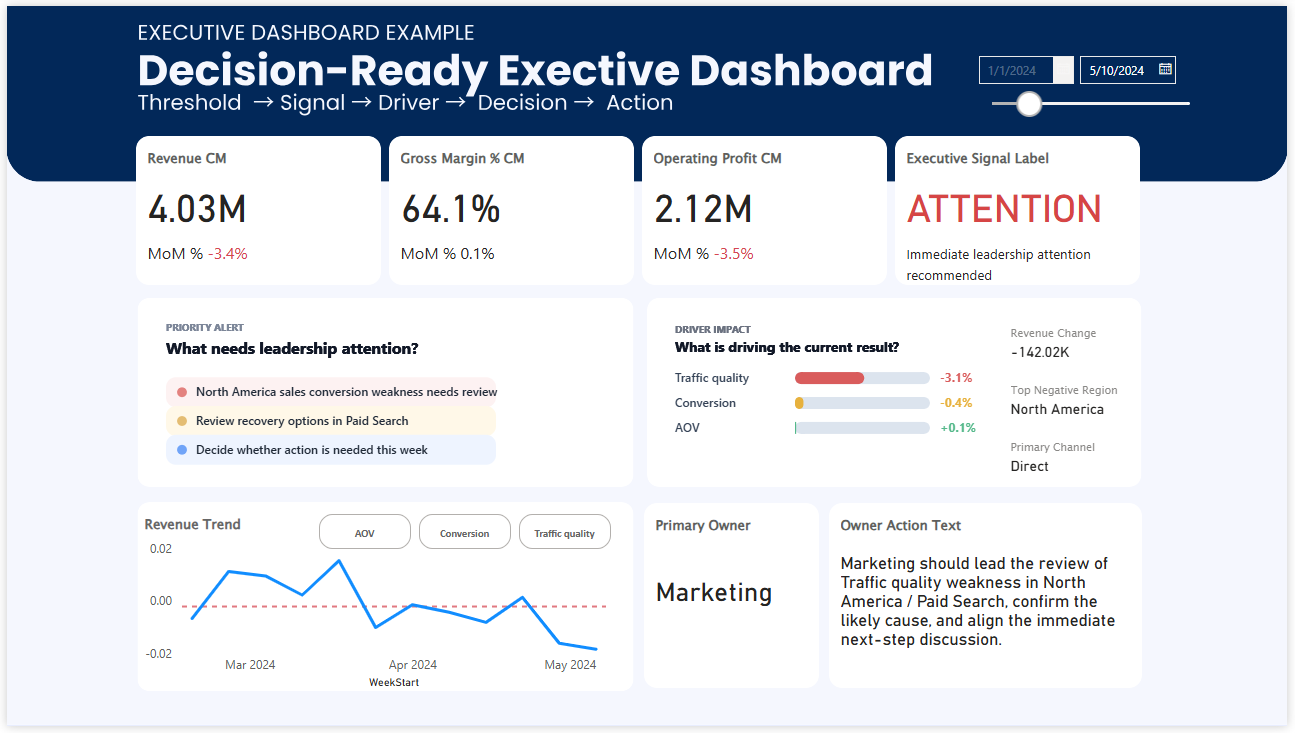
Real executive dashboard example: one leadership signal is connected to its likely drivers, responsible owner, and recommended next action.
Signal
Revenue and operating profit are weakening enough to require leadership attention.
Driver
Traffic quality and conversion weakness in North America are driving the result.
Decision
Decide whether immediate action is needed and assign the next review to the right owner.
What the dashboard shows
- •Overall business signal and threshold status
- •The commercial drivers behind the result
- •The region and channel requiring attention
- •A named owner and recommended next action
Why this example works
It does not ask leaders to scan every metric with equal attention. It establishes the signal first, explains the likely cause, and turns the finding into an owned business discussion.
Use this when
Leadership meetings spend too much time reporting status, issues are discussed without clear ownership, or the same KPI review repeats without a decision.
Example 3
Marketing decision dashboard
A decision dashboard connects spend, channel efficiency, funnel quality, and conversion into one performance story.
Concept illustration: the dashboard connects CAC, channel efficiency, and funnel quality to a specific budget reallocation decision.
Signal
Customer acquisition cost is up 18% while lead volume remains stable.
Driver
Paid social efficiency and qualified conversion are weakening.
Decision
Choose whether to change channel mix, improve conversion, or investigate lead quality.
What it should show
- •CAC and ROAS versus expected range
- •Channel efficiency and spend mix
- •Funnel quality from visit to won customer
- •The stage where performance is breaking
Use this when
The team cannot agree whether the issue is volume, quality, or channel mix.
Example 4
Customer acquisition decision dashboard
This dashboard connects acquisition growth with activation, retention, and customer quality.
Concept illustration: acquisition is growing, but activation and retention reveal that customer quality should be fixed before spend is scaled.
Signal
New customers are growing, but activation and 30-day retention are weakening.
Driver
Acquisition volume is healthy, but post-signup customer quality is deteriorating.
Decision
Choose whether to scale acquisition or improve activation and retention first.
What it should show
- •Acquisition volume by source
- •Activation and retention health
- •Customer quality by channel or cohort
- •Where the customer journey is weakening
Use this when
Growth looks positive while activation, retention, or customer quality weakens underneath.
Example 5
Operations decision dashboard
An operations decision dashboard surfaces bottlenecks before delays and quality problems become expensive.
Concept illustration: service deterioration is connected to capacity pressure, ranked bottlenecks, an owner, and a specific first response.
Signal
On-time delivery is below target while utilization remains near maximum.
Driver
Dispatch queues, manual review, and supplier delays are increasing friction.
Decision
Choose which bottleneck requires the first operational response.
What it should show
- •Service level versus target
- •Capacity pressure and process delays
- •Bottleneck ranking by business impact
- •Early warning signals before failure
Use this when
Teams can see delays but cannot decide which bottleneck deserves the first response.
Common design mistakes
Why many dashboards still do not support decisions
A dashboard can contain accurate data and still make decision-making difficult. These patterns usually increase interpretation time instead of reducing it.
Too many competing KPIs
When every metric has equal visual weight, users must decide for themselves which issue deserves attention first.
No meaningful threshold
A change is visible, but the user cannot tell whether it is normal variation or a business problem requiring action.
Drivers are separated from the signal
The KPI and its causes appear on different pages, forcing the meeting to restart the analysis before discussing a response.
No owner or next step
The meeting identifies an issue, but the dashboard gives no indication of who should respond or what should happen next.
Practical framework
How to build a decision dashboard
Start with the decision, then add only the information needed to make that decision easier.
Frequently asked questions
Decision dashboard FAQ
What should a decision dashboard include?
A clear signal, a threshold, relevant context, likely drivers, and a visible next question or action.
What is a decision support dashboard?
A dashboard that organizes data so users can compare options, understand risk, and make a specific decision with less uncertainty.
Is it the same as an executive dashboard?
Not always. An executive dashboard can be decision-oriented, but many still focus mainly on high-level reporting.
Can Power BI support decision dashboards?
Yes. Power BI supports KPI hierarchy, thresholds, drill-through, driver analysis, annotations, and action-oriented layouts.
How many KPIs should it show?
Only the KPIs needed to recognize the signal and understand the decision context.
What is its main purpose?
To shorten the path from performance data to business judgment, discussion, and action.
Continue exploring
Related dashboard resources
Ready-to-use Power BI template
Start with a dashboard already built around decision structure
Use a cleaner Power BI starting point designed around signals, drivers, priorities, and the next business conversation.